03.11.2023
Blog
Cloud Transformation

Monitoring containers effectively with AWS CloudWatch

It is when customers start running container environments in the cloud that they begin to realise the true added value of cloud usage. With the right strategy and tools such as AWS CloudWatch Container Insights, containers can be integrated into the most suitable cloud platform very quickly, in a scalable and cost-optimised manner. Find out more in today’s final instalment of our AWS blog series on container observability.

Eckhard Eilers
Cloud Business Consultant / Cloud Architekt

The easiest way to achieve a true hybrid or multi-cloud setup is through container deployments. This avoids vendor lock-in (or at least significantly reduces the risk of it). No wonder the container community no longer questions the ‘multi-cloud paradigm’ at all.

Services such as AWS EKS or AWS ECS / Fargate make getting started incredibly easy. Whilst Fargate enables serverless container operation (and thus attractive billing models), the Elastic Kubernetes Service (EKS) offers a fully managed Kubernetes cluster in the cloud, which differs only marginally in operation from on-premises clusters.

To monitor container environments, customers have often relied on third-party solutions such as Prometheus. However, integrating these into automation within the AWS cloud frequently required extensive customisation of the deployment. Conversely, the functionality of CloudWatch – the central monitoring and observability platform in AWS – could only be utilised to a very limited extent for containers, as the key metrics are instance-specific.

The introduction of Amazon CloudWatch Container Insights changes this significantly, both for Elastic Container Services (ECS) and for Kubernetes environments (e.g. EKS).

Deployment: Just one click away

For EKS clusters (and your own Kubernetes clusters), the Container Insights agent is available as a container. Deploying Container Insights in ECS is incredibly simple:

  • Existing ECS clusters can be enabled using the AWS CLI:
    aws ecs update-cluster-settings –cluster [myECSCluster] –settings name=containerInsights,value=enabled
  • New ECS clusters to be deployed are configured via the AWS Console under ‘Account Settings’ > Update > CloudWatch Container Insights

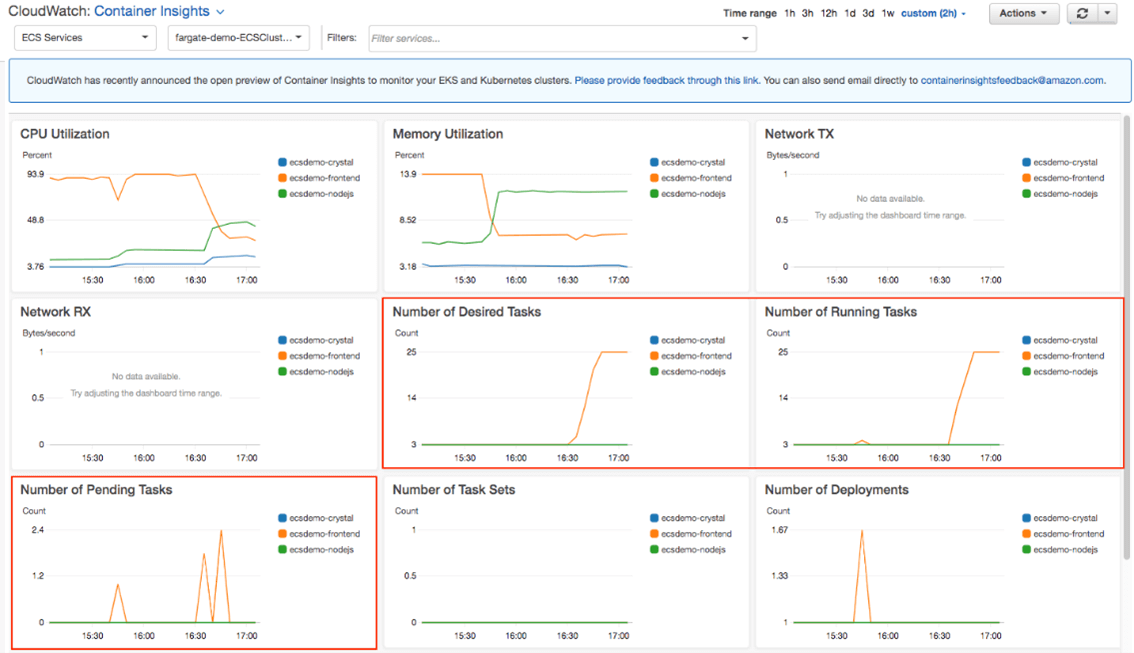
Afterwards, the following metrics are available in CloudWatch:

  • CPU and memory usage
  • Task and service count
  • Storage usage: read and write
  • Network throughput
  • Number of containers, broken down by tasks, services and clusters.
  • as well as other metrics.

Integrating these metrics into CloudWatch offers numerous benefits:

  • Container logs can be analysed dynamically using CloudWatch Logs Insights.
  • CloudWatch Alarms, based on container metrics, can trigger automated actions, such as a Lambda function. This allows for further automation of the container environment.
  • CloudWatch Container Insights metrics can be displayed directly on a CloudWatch dashboard. This reduces the need for third-party tools such as Prometheus and/or Grafana.
Das CloudWatch Container Insights Dashboard (Quelle: amazon.com)

What are the benefits of Cloud Insight?

Those who use container environments face a wide range of challenges:

  • Container environments are short-lived. This is inherent to the nature of containers. Short deployment cycles make it difficult to track events and resources.
  • Monitoring operational metrics (such as CPU usage and memory) is complex, as these are constantly changing.
  • Traditional monitoring or ITSM platforms provide only inadequate metrics for monitoring containers.
  • Expertise in this area is scarce. Solutions are therefore needed that visualise complex issues arising from container usage.

Container Insights helps users address these issues and achieve key objectives of cloud usage, particularly when implementing the Well-Architected Framework (WAF):

  • A unified monitoring and alerting platform such as CloudWatch provides a consolidated view of the entire cloud environment, reduces training requirements, improves visibility and serves as the starting point for automated maintenance of the environment
  • At the same time, maintenance effort is reduced – or, to put it another way, ‘operational efficiency’ is increased.
  • Speed (e.g. in development) and agility are increased

Thus, simply by integrating the container platform, the added value of a container environment in the cloud can be significantly increased.

Where is the best place to start?
Materna works with customers planning to implement Container Insights and Logs Insights to develop, as part of a workshop, the project approach, the appropriate set of metrics, the integration path and, where necessary, further integrations (e.g. with Open Telemetry). Please feel free to get in touch.


All posts in this blog series:

Part 1 – Managing cloud environments with AWS Systems Manager
Part 2 – Monitoring compliance in the AWS cloud with AWS Config
Part 3 – Structuring accounts with AWS Organizations

Eckhard Eilers
Cloud Business Consultant / Cloud Architekt

Eckhard Eilers ist Cloud Business Consultant und Cloud Architekt im Team Cloud Innovation & Optimization bei Materna. Er beschäftigt sich mit der Migration von IT-Umgebungen und dem Aufbau von Enterprise Architektur-Strukturen in Unternehmen.