29.06.2023
Blog
Cloud Transformation

Managing cloud environments with AWS Systems Manager

This blog post marks the start of a series of blog posts focusing on AWS system management tools. As well as AWS Systems Manager, which is described in this post, further articles will follow on AWS Config, AWS Organisations and AWS CloudWatch.

Eckhard Eilers
Cloud Business Consultant / Cloud Architekt

Cloud environments (and, of course, data centre environments) tend to become large and unwieldy. A test environment here and a small tool server there can be set up in no time, and so cloud environments quickly grow out of control.

It would be ideal if there were a way to monitor such environments for security, resilience and compliance, and to automatically implement necessary changes to the environment without first having to roll out complex software.

AWS provides a whole suite of services for this purpose, which help to centrally monitor the lifecycle of the AWS environment. ‘AWS Systems Manager’ serves as the central application for the lifecycle management of a cloud or on-premises environment. The ‘AWS Config’ service checks the compliance of deployed systems with company policies. As Systems Manager frequently contains cross-references to AWS Config, it makes sense to implement both tools at an early stage. This can be done relatively quickly and easily.

What can AWS Systems Manager do?

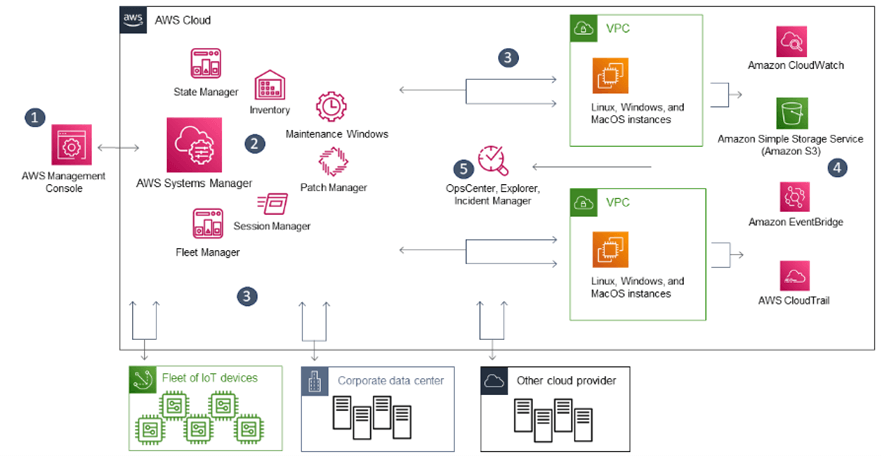
The diagram illustrates just how powerful the tool is: using Systems Manager, not only can resources in AWS be inventoried and started or stopped at scheduled times, but systems can also be patched automatically (Patch Manager). It allows you to coordinate remote access, apply runbooks to systems (e.g. for system failures and malfunctions) and generate and analyse runtime statistics. Furthermore, Systems Manager is not limited to the current AWS account. For the management of hybrid (i.e. cloud and on-premises) environments, resources in other clouds and even in on-premises data centres can also be integrated using the Fleet Manager. This enables the management of AWS Edge Devices and even on-premises servers. In this way, Systems Manager evolves into a central service management platform. Sophisticated change management with ITIL-compliant approval processes rounds off the functionality. Changes to systems can be planned, approved and rolled out automatically.

How does the rollout work?

AWS Systems Manager can be found in the AWS Console via the ‘Management & Governance’ menu or via the search bar. If no environment has yet been defined, a basic configuration can be set up very quickly using Quick Setup. This creates the necessary IAM roles as well as rules for CloudWatch or Amazon S3 logging.

Using AWS Systems Manager is relatively straightforward. The Quick Setup feature makes it easy to provision the necessary roles and functions. In most cases, the required changes are deployed after completing one or two configuration pages and clicking ‘Finish’. The inventory of the current environment is then displayed and initial operational metrics are generated. In-depth knowledge of AWS is valuable, but not strictly necessary at this stage. However, it is advisable to review the permissions assigned to roles at a later stage.

Using ‘Host Management’ is a good starting point for gaining an overview of the resources provisioned in AWS. Subsequently, AWS Config can be used to ensure compliance with company policies. Runtime statistics reflect the efficiency and availability of the deployed instances. Building on this foundation, other components such as Change Manager and Patch Manager can also be put into operation.

There are some costs associated with using AWS Systems Manager, which are best estimated in advance using the AWS Pricing Calculator. We would be happy to advise you on selecting the correct parameters.

Conclusion

AWS Systems Manager is a good option for customers who do not yet have a cloud-enabled system management solution in their portfolio and who wish to monitor and control the lifecycle of their cloud environment quickly and relatively cost-effectively.

Further posts in our blog series on AWS system management tools:

Part 2 – Monitoring compliance in the AWS cloud with AWS Config
Part 3 – Structuring accounts with AWS Organizations
Part 4 – Successfully monitoring containers with AWS CloudWatch

(c) AWS : Der AWS Systems Manager in der IT-Umgebung

What can AWS Systems Manager do?

The diagram illustrates just how powerful this tool is: using Systems Manager, you can not only inventory resources in AWS and start and stop them on a scheduled basis, but you can also automatically patch systems (Patch Manager). It allows you to coordinate remote access, apply runbooks to systems (e.g. for system failures and malfunctions) and generate and analyse runtime statistics. Furthermore, Systems Manager is not limited to the current AWS account. For the management of hybrid (i.e. cloud and on-premises) environments, the Fleet Manager can also be used to integrate resources in other clouds and even in on-premises data centres. This enables the management of AWS Edge Devices and even on-premises servers. In this way, Systems Manager evolves into a central service management platform. Sophisticated change management with ITIL-compliant approval processes rounds off the functionality. Changes to systems can be planned, approved and rolled out automatically.

How does the rollout work?

AWS Systems Manager can be found in the AWS Console via the ‘Management & Governance’ menu or via the search bar. If no environment has yet been defined, a basic configuration can be set up very quickly using Quick Setup. This creates the necessary IAM roles as well as rules for CloudWatch or Amazon S3 logging.

Using AWS Systems Manager is relatively straightforward. The Quick Setup feature makes it easy to provision the necessary roles and functions. In most cases, the required changes are implemented after completing one or two configuration pages and clicking ‘Finish’. The inventory of the current environment is then displayed and initial operational metrics are generated. In-depth knowledge of AWS is valuable, but not strictly necessary at this stage. However, it is advisable to review the permissions assigned to roles at a later stage.

Using ‘Host Management’ is a good starting point for gaining an overview of the resources provisioned in AWS. Subsequently, AWS Config can be used to ensure compliance with company policies. Runtime statistics reflect the efficiency and availability of the deployed instances. From this point onwards, other components such as Change Manager and Patch Manager can also be put into operation.

There are some costs associated with using AWS Systems Manager, which are best estimated in advance using the AWS Pricing Calculator. We would be happy to advise you on selecting the right parameters.

Conclusion

AWS Systems Manager is a good option for customers who do not yet have a cloud-enabled system management solution in their portfolio and wish to monitor and control the lifecycle of their cloud environment quickly and relatively cost-effectively.

Further articles in our blog series on AWS system management tools:

Part 2 – Monitoring compliance in the AWS Cloud with AWS Config
Part 3 – Organising accounts with AWS Organizations
Part 4 – Successfully monitoring containers with AWS CloudWatch

Eckhard Eilers
Cloud Business Consultant / Cloud Architekt

Eckhard Eilers ist Cloud Business Consultant und Cloud Architekt im Team Cloud Innovation & Optimization bei Materna. Er beschäftigt sich mit der Migration von IT-Umgebungen und dem Aufbau von Enterprise Architektur-Strukturen in Unternehmen.